Amazon Product photography plays a major role in how customers perceive products on Amazon. Before shoppers read product descriptions or reviews, they often look at the images first.
Even high-quality products can struggle to attract attention if the photos fail to show important details clearly. The good news is that many product photography problems are easy to identify and fix.
In this guide, we’ll cover the most common Amazon product photography mistakes sellers make and explain how to avoid them.
Why Product Photography Matters on Amazon
Amazon customers rely heavily on product images when making purchasing decisions.
Good product photos help customers:
- Understand the product
- View important details
- Compare options
- Build confidence before purchasing
Poor photography can create confusion and make products appear less professional.
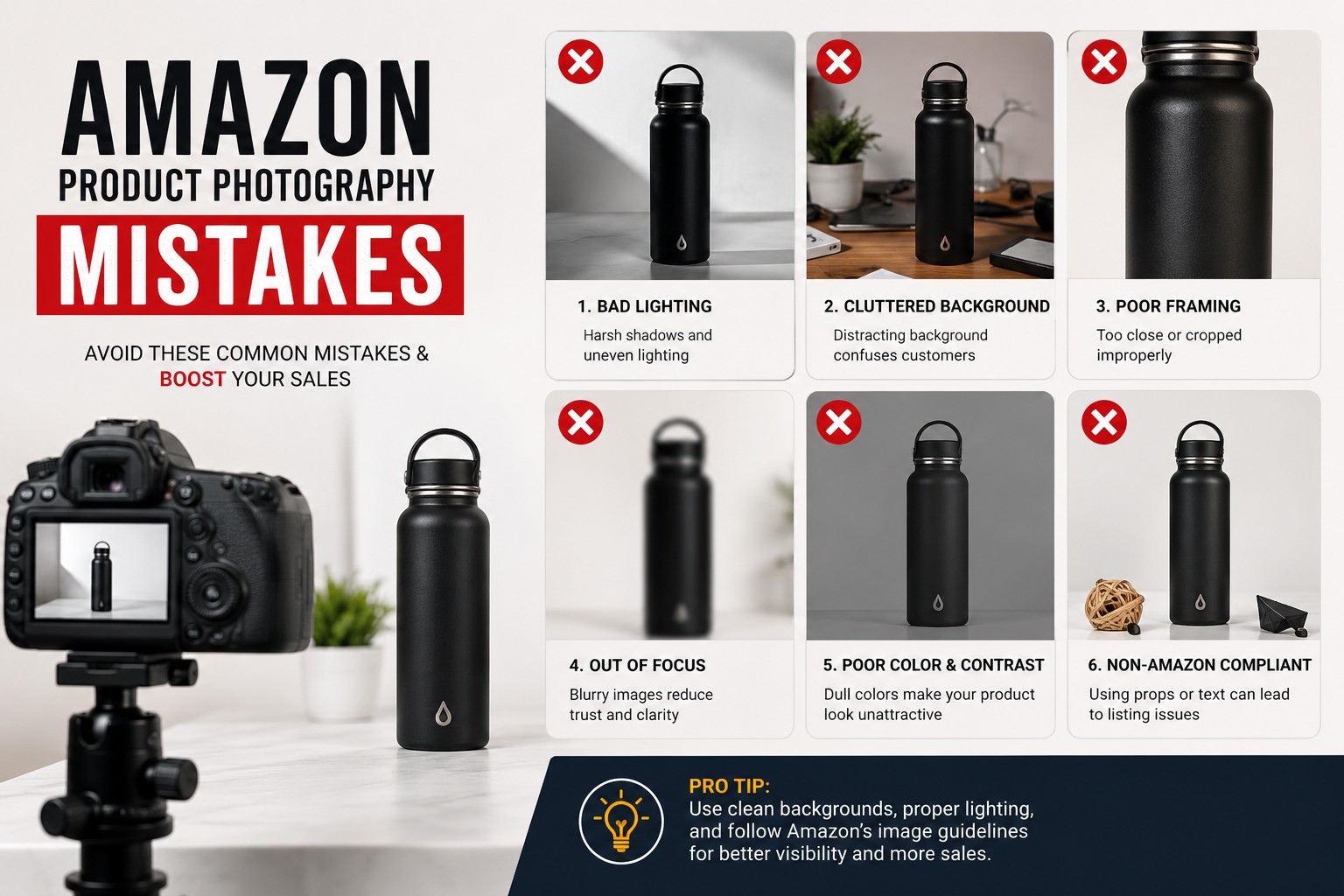
Mistake #1: Using Poor Lighting
Lighting is one of the most important factors in product photography.
Unfortunately, many sellers use harsh direct lighting or inconsistent light sources.
This often creates:
- Strong shadows
- Uneven brightness
- Unwanted reflections
- Color inaccuracies
How to Avoid It
Use soft and even lighting whenever possible.
Options include:
- Softboxes
- LED panels
- Diffused natural light
- Light tents
Proper lighting helps reveal product details without creating distractions.
Mistake #2: Photographing Dirty Products
Dust, fingerprints, and small imperfections become much more noticeable in product photos.
This is especially true for:
- Jewelry
- Electronics
- Glass products
- Metal products
How to Avoid It
Before every photoshoot:
- Clean the product thoroughly
- Remove fingerprints
- Check for dust
- Inspect surfaces under bright light
Spending a few minutes cleaning products can reduce editing time later.
Mistake #3: Using Busy Backgrounds
A cluttered background can distract customers from the product.
Many beginners photograph products on:
- Desks
- Countertops
- Random household surfaces
This often takes attention away from the item being sold.
How to Avoid It
Use simple backgrounds that keep the focus on the product.
Popular choices include:
- White backgrounds
- Light gray backgrounds
- Clean lifestyle settings
The product should remain the main subject of the image.
Mistake #4: Poor Background Removal
Background removal is common in Amazon product photography and Amazon product photo editing, but poorly edited images can create problems.
Common issues include:
- Jagged edges
- Missing product details
- Uneven cutouts
- Artificial-looking results
How to Avoid It
Pay close attention to product edges during editing.
Products with:
- Fur
- Transparent materials
- Jewelry
- Reflective surfaces
often require more precise editing.
Mistake #5: Blurry Product Images
Customers want to zoom in and inspect products before buying.
Blurry photos make this difficult.
Common causes include:
- Camera movement
- Incorrect focus
- Low image resolution
- Poor camera settings
How to Avoid It
Use:
- A tripod
- Manual focus when necessary
- Adequate lighting
- High-resolution image capture
Sharp images help customers see product details more clearly.
Mistake #6: Inaccurate Product Colors
Color accuracy is important for customer satisfaction.
If the product looks different in person than it does online, customers may become disappointed.
How to Avoid It
Use proper white balance settings and perform color correction during editing.
Try to represent products as accurately as possible.
This is especially important for:
- Clothing
- Jewelry
- Home decor
- Beauty products
Mistake #7: Showing Too Few Product Angles
A single product image rarely answers all customer questions.
Customers often want to see:
- Front view
- Side view
- Back view
- Close-up details
How to Avoid It
Capture multiple angles and include detail shots when relevant.
This helps customers understand the product more completely.
Mistake #8: Ignoring Product Details
Many products have features that deserve closer attention.
Examples include:
- Jewelry engravings
- Fabric texture
- Product controls
- Connectors and ports
- Packaging details
How to Avoid It
Include close-up images that highlight important features.
Detail shots often help answer customer questions before they arise.
Mistake #9: Inconsistent Product Images
One common problem among growing Amazon sellers is inconsistency.
Products photographed at different times may have:
- Different backgrounds
- Different colors
- Different lighting
- Different editing styles
How to Avoid It
Create a consistent photography workflow.
Use:
- The same background
- Similar lighting
- Consistent editing standards
This helps create a more professional-looking catalog.
Mistake #10: Overediting Product Photos
Editing is important, but excessive editing can create unrealistic results.
Common examples include:
- Oversaturated colors
- Artificial shadows
- Unrealistic reflections
- Excessive sharpening
How to Avoid It
Use editing to improve image quality, not to change the actual product.
Customers should receive a product that closely matches the listing photos.
Mistake #11: Using Low-Resolution Images
Customers frequently zoom into product images.
Low-resolution photos can appear:
- Pixelated
- Soft
- Unprofessional
How to Avoid It
Capture images at a high resolution and maintain image quality throughout the editing process.
High-quality source images provide more flexibility during editing.
Mistake #12: Not Using Lifestyle Images
Many sellers rely only on standard product photos.
While these images are important, they don’t always show how products are used.
How to Avoid It
Add lifestyle images that demonstrate:
- Product usage
- Scale
- Real-world context
Lifestyle photos help customers visualize the product in everyday situations.
Mistake #13: Forgetting Mobile Users
A large portion of Amazon traffic comes from mobile devices.
Images that look good on a desktop screen may not be as effective on smaller screens.
How to Avoid It
Review images on mobile devices before publishing.
Make sure:
- Text remains readable
- Features remain visible
- Important details are easy to understand
Mistake #14: Rushing Product Photography
Many sellers rush through product photography to get listings published quickly.
This often leads to:
- Missed details
- Poor lighting
- Inconsistent images
- Additional editing work
How to Avoid It
Take time to prepare:
- Products
- Lighting
- Backgrounds
- Camera settings
A few extra minutes during the photoshoot can save hours later.
Mistake #15: Doing Everything Yourself
As product catalogs grow, photography and editing can become overwhelming.
Many sellers spend hours editing images instead of focusing on:
- Marketing
- Inventory management
- Product sourcing
- Customer support
How to Avoid It
Consider outsourcing image editing when workloads increase.
Professional editing services can help maintain consistency and reduce production time.
Amazon Product Photography Checklist
Before uploading images, ask yourself:
✅ Is the product clean?
✅ Are the images sharp?
✅ Are colors accurate?
✅ Is the background clean?
✅ Are multiple angles included?
✅ Are important details visible?
✅ Is the editing consistent?
✅ Do the images accurately represent the product?
Final Thoughts
Many Amazon product photography mistakes are easy to avoid once you know what to look for. Good lighting, clean products, accurate colors, sharp focus, and consistent editing can significantly improve how products appear online.
Whether you’re photographing products yourself or working with a professional editing team, focusing on image quality helps create a better shopping experience and a more professional product catalog.
Frequently Asked Questions
What is the biggest product photography mistake on Amazon?
Poor lighting is one of the most common mistakes because it affects image clarity, color accuracy, and product presentation.
Why do Amazon product images look blurry?
Blurry images are often caused by camera movement, poor focus, or low-resolution photography.
Should Amazon product photos be edited?
Most product images benefit from editing such as background removal, retouching, and color correction.
How many product photos should an Amazon listing have?
Including multiple product views, detail shots, and lifestyle images helps customers better understand the product.
Can professional editing improve product photos?
Professional editing can help create cleaner, more consistent images while maintaining accurate product representation.