When customers browse Amazon, they often make quick decisions based on what they can see. While the main product image helps attract attention, infographic images help explain why someone should buy the product.
Amazon infographic images combine product photos, text, icons, and visual elements to communicate important information in a simple and easy-to-understand format.
In this guide, you’ll learn what Amazon infographic images are, why they matter, and examples you can use to improve your product listings.
What Are Amazon Infographic Images?
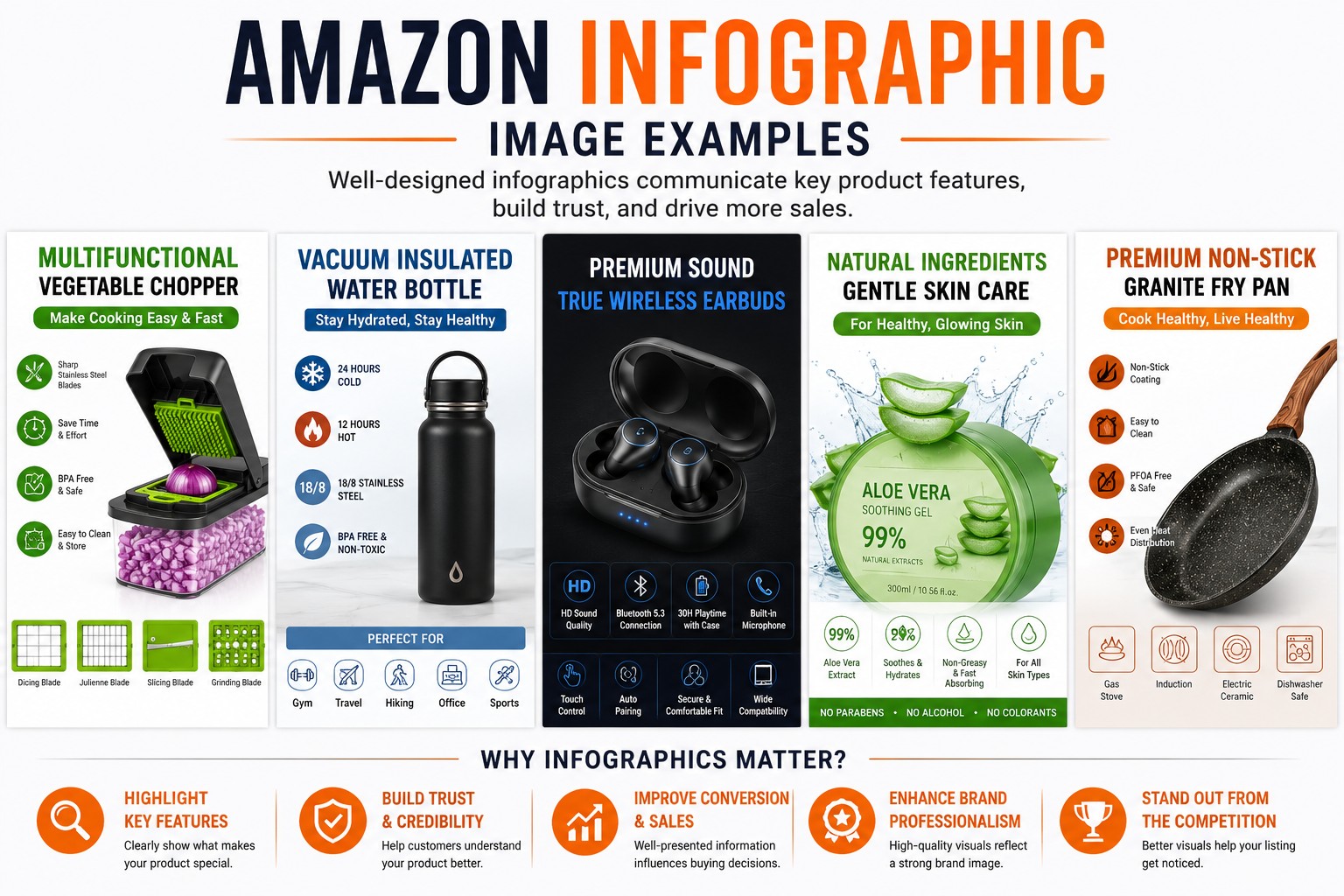
Amazon infographic images are secondary listing images designed to highlight product features, specifications, benefits, and usage information.
Unlike the main image, infographic images can include:
- Text
- Icons
- Measurements
- Product callouts
- Feature highlights
- Comparison graphics
Their purpose is to answer customer questions visually.
Why Amazon Infographic Images Matter
Customers don’t always read product descriptions.
Many shoppers scroll through product images first to understand:
- Product size
- Features
- Materials
- Benefits
- Compatibility
- Usage instructions
Well-designed infographic images help communicate this information quickly.
Benefits of Amazon Infographic Images
- Improve product understanding
- Highlight important features
- Reduce customer confusion
- Showcase product benefits
- Support purchasing decisions
- Make listings more informative
Amazon Infographic Image Example #1: Product Features
One of the most common infographic styles focuses on product features.
Example
A water bottle infographic might highlight:
- Leak-proof lid
- Stainless steel construction
- Double-wall insulation
- BPA-free materials
Each feature can be connected to the product image using simple labels and icons.
Why It Works
Customers can quickly understand what makes the product different from competitors.
Amazon Infographic Image Example #2: Product Dimensions
Size-related questions are common on Amazon.
A dimension infographic clearly shows:
- Height
- Width
- Length
- Capacity
- Weight
Example
A storage container listing might display:
- Product measurements
- Internal dimensions
- Storage capacity
Why It Works
It helps customers determine whether the product fits their needs.
Amazon Infographic Image Example #3: Material Breakdown
Many products are purchased based on material quality.
Example
For jewelry products:
- Sterling silver
- Gold plating
- Natural gemstones
For cookware:
- Stainless steel
- Aluminum core
- Non-stick coating
Why It Works
Customers gain confidence when materials are clearly explained.
Amazon Infographic Image Example #4: Product Benefits
Instead of listing technical features, focus on customer benefits.
Example
A standing desk infographic could highlight:
- Better posture
- Adjustable height
- Increased workspace
- Easy assembly
Why It Works
Benefits help customers understand how the product may improve their experience.
Amazon Infographic Image Example #5: How to Use the Product
Usage instructions can be presented visually.
Example
A skincare product infographic might show:
- Clean face
- Apply serum
- Massage gently
- Use daily
Why It Works
Visual instructions are often easier to understand than long paragraphs.
Amazon Infographic Image Example #6: Product Comparison
Comparison images help shoppers evaluate different options.
Example
A product comparison chart may show:
| Feature | Your Product | Standard Alternative |
|---|---|---|
| Material Quality | High | Standard |
| Durability | Long-lasting | Average |
| Warranty | Included | Limited |
Why It Works
Customers can quickly identify differences.
Amazon Infographic Image Example #7: Package Contents
Customers often want to know exactly what is included.
Example
A camera accessory kit infographic may display:
- Tripod
- Carrying case
- Phone mount
- Cleaning cloth
Why It Works
Reduces confusion about included items.
Amazon Infographic Image Example #8: Product Applications
Show different ways customers can use the product.
Example
A portable light might be shown:
- Camping
- Emergency situations
- Outdoor activities
- Home use
Why It Works
Demonstrates versatility.
Amazon Infographic Image Example #9: Before and After Results
This format is often used for products where visible improvement is important.
Examples
- Cleaning products
- Home improvement products
- Beauty products
- Restoration products
Why It Works
Customers can easily understand the intended outcome.
Amazon Infographic Image Example #10: Key Selling Points
Some infographic images focus on the most important reasons to buy.
Example
A backpack infographic might highlight:
- Water-resistant material
- Multiple compartments
- Laptop storage
- Comfortable straps
Why It Works
Important information is presented in one place.
Best Practices for Amazon Infographic Images
Keep Text Simple
Avoid overcrowding images with large amounts of text.
Focus on Customer Questions
Think about what buyers want to know before purchasing.
Use Clear Product Photos
Infographics should support product images, not replace them.
Maintain Consistent Branding
Use similar fonts, layouts, and styles across your listing images.
Prioritize Readability
Text should remain clear on mobile devices.
Common Amazon Infographic Mistakes
Too Much Information
Overloaded images can overwhelm customers.
Small Text
Text should be easy to read on both desktop and mobile devices.
Poor Image Quality
Low-quality graphics reduce professionalism.
Inconsistent Design
Different styles across images can make listings appear unorganized.
Generic Claims
Focus on specific product information rather than vague marketing statements.
Creating Amazon Infographic Images
Many sellers create infographic images using:
- Adobe Photoshop
- Adobe Illustrator
- Canva
- Figma
Professional designers and amazon image editing services can also create infographic images for Amazon listings.
When Should You Use Amazon Infographic Images?
Infographic images work particularly well when:
- Products have multiple features
- Dimensions are important
- Materials need explanation
- Usage instructions are helpful
- Product benefits need clarification
They are especially useful for electronics, home products, beauty items, fitness products, tools, and jewelry.
Final Thoughts
Amazon infographic images help turn product information into visual content that customers can quickly understand. Whether you’re highlighting features, dimensions, benefits, or usage instructions, well-designed infographics can make your listings more informative and easier to navigate.
For many sellers, infographic images are one of the most effective ways to explain products and support customer buying decisions without relying solely on text descriptions.
Frequently Asked Questions
What are Amazon infographic images?
Amazon infographic images are secondary listing images that use text, icons, and graphics to explain product features and benefits.
How many infographic images should an Amazon listing have?
Many sellers include several infographic images alongside lifestyle and detail photos.
Can infographic images improve product listings?
They can help customers understand products more quickly and answer common questions visually.
What should be included in an Amazon infographic?
Common elements include product features, dimensions, materials, benefits, and usage information.
Are infographic images allowed on Amazon?
Infographics are commonly used as secondary listing images to provide additional product information.